Worked examples on real data
Five end-to-end runs on the full-size Sample 2 and Sample 3 datasets, on a SLURM cluster with NVIDIA A30 GPUs. The commands, logs and numbers are from those runs; yours will depend on your data and hardware.
Each example has a matching tutorial that runs the same calls on a small crop of the same data, shipped with the repository, so you can reproduce the steps before pointing them at your own files.
| Example | Data | Result | Time | Try it on a crop | |
|---|---|---|---|---|---|
| 1 | SM → ST, sequential sections | 459,969 MALDI pixels, 53,622 Xenium cells | 16.4 µm median to nearest ST cell | 72 s, one A30 | Tutorial 3 |
| 2 | Orientation search | the same MALDI section | recovers the 90° rotation | 52 s | Tutorial 3 |
| 3 | Nuclei → Xenium, same section | 88,906 nuclei, 74,247 cells | held-out TRE 11.0 → 4.9 µm; 88% of cells get a nucleus | 3 s | Tutorial 2 |
| 4 | Segmentation on one GPU | 2048 px crop, 3 channels | 33 cells, 29 nuclei | 23 s, one A30 | Tutorial 1 |
| 5 | Distributed segmentation | 4096 px tile scan, 16 tiles | 44 cells, 44 nuclei | 0.6 min, four A30s | Tutorial 4 |
1. Spatial metabolomics → spatial transcriptomics
MALDI spatial metabolomics (SM) acquired on a section neighbouring a Xenium spatial transcriptomics (ST) section. The tissue differs between sections, so this uses STalign LDDMM guided by manual landmarks.
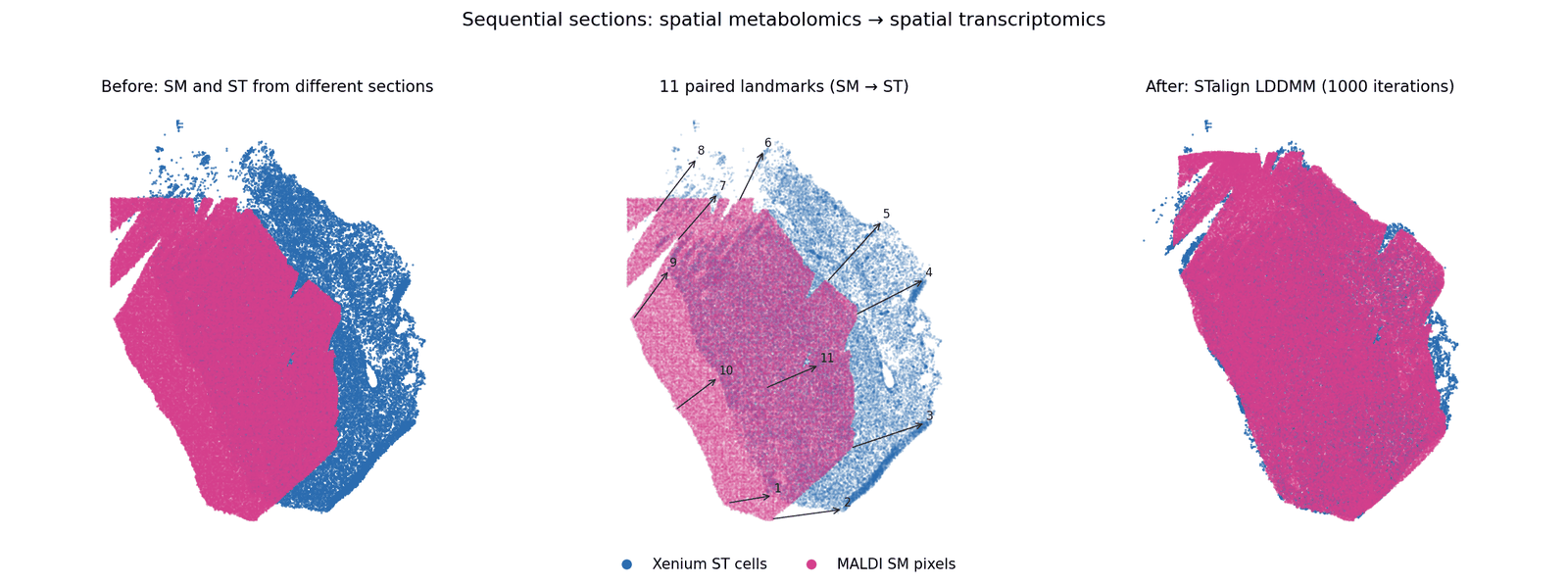
Sample 2, Xenium section Z2 and MALDI section B. 459,969 SM pixels, 53,622 ST cells, 11 landmark pairs.
| File | Contents |
|---|---|
sample2_xenium_z2.csv |
Xenium cells; registration uses x_final / y_final (auto-detected) |
sample2_maldi_section_B.csv |
MALDI pixels: x, y and one column per m/z (442 MB) |
sample2_z2_st_points.npy, sample2_z2_sm_points.npy |
11 paired landmarks |
Step 1 — rasterise both modalities for landmarking.
from smint.alignment import prepare_landmark_inputs

out = prepare_landmark_inputs(
    st_file="sample2_xenium_z2.csv",
    sm_file="sample2_maldi_section_B.csv",
    output_prefix="sample2_z2",
    sm_kwargs=dict(scale_xy=10.0, rotate_left_90=True),   # MALDI pixels -> microns
)
Step 2 — place landmarks. Open the two datasets in the
napari plugin (Plugins → SMINT Registration →
3. Landmarks), or run STalign's point_annotator.py on the two .npz files.
Pick the same features in the same order in both; correspondence is
positional.
Step 3 — register on a GPU node.
smint-alignment st-sm \
    --st sample2_xenium_z2.csv \
    --sm sample2_maldi_section_B.csv \
    --st-points sample2_z2_st_points.npy \
    --sm-points sample2_z2_sm_points.npy \
    --rotate-left-90 --orientation stalign \
    --output-dir sample2_z2_registration \
    --submit --watch --partition gpuq --gpus 1 --memory 64G \
    --worker-python /path/to/stalign-env/bin/python
from smint.alignment import register_sm_to_st

sm = register_sm_to_st(
    st_file="sample2_xenium_z2.csv",
    sm_file="sample2_maldi_section_B.csv",
    st_points_file="sample2_z2_st_points.npy",
    sm_points_file="sample2_z2_sm_points.npy",
    sm_kwargs=dict(scale_xy=10.0, rotate_left_90=True),
    orientation="stalign",
    output_path="sm_transformed.csv",
)
The worker ran LDDMM (1,000 iterations) on one A30; from submission to
finished output, including queueing, took 72 s. The output keeps every m/z
column and adds x_transformed / y_transformed.
Pass orientation=\"stalign\" to overlay on ST
The default, "dataset", reproduces historical outputs but is transposed
relative to the ST cells. Plotted over ST it looks like a failed
registration. See STalign works in row-column order.
Step 4 — check the result.
import numpy as np, pandas as pd
from scipy.spatial import cKDTree

st = pd.read_csv("sample2_xenium_z2.csv", usecols=["x_final", "y_final"]).to_numpy()
sm = pd.read_csv("sm_transformed.csv", usecols=["x_transformed", "y_transformed"]).to_numpy()
d, _ = cKDTree(st).query(sm)
print(f"median distance to nearest ST cell: {np.median(d):.1f} um")
That is about half a 30 µm raster pixel. Because the sections differ, there is no ground truth to score against; this distance and the overlay are the practical checks. Tutorial 3 runs the same registration on a quarter of these MALDI pixels, and adds a synthetic pair where the true error is known.
2. Coarse pre-registration with an orientation search
Before landmarking, bring a dataset roughly into the target frame. MALDI pixels from section B (converted to microns) arrive rotated relative to the Z2 Xenium cells:
smint-alignment pretransform \
    --source sample2_sm_xy.csv --target sample2_xenium_z2.csv \
    --search --output sample2_sm_pre.csv
INFO smint.cli.align: Best: rotation=90 flip_x=False flip_y=False
scale        : 1.2161, 1.2161
rotation     : 90.00 deg
reflects     : False
overlap      : 0.954
wrote        : sample2_sm_pre.csv
transform    : sample2_sm_pre.csv.transform.json
--search tries every 15° rotation with and without each flip and keeps the
best overlap score. Here it recovered the 90° rotation that the MALDI pipeline
otherwise applies by hand (rotate_left_90=True), in 52 s for 459,969 pixels.
The matrix and its decomposition are saved next to the output, so the step can
be reproduced exactly. The napari plugin's 2. Pre-register widget does the
same interactively, and Tutorial 3
runs the search in Python.
3. Same-section registration: nuclei onto Xenium cells
When a second modality is acquired on the same section — here, nuclei segmented from a post-Xenium stain of Sample 2 section z5 — centroids correspond one-to-one:
smint-alignment centroid \
    --source sample2_nuclei_z5.csv --source-cols x_centroid y_centroid \
    --target sample2_xenium_z5.csv \
    --output-dir z5_nuclei_to_xenium
{
  "method": "multiround",
  "n_matched": 49206,
  "tre_initial": 10.96,
  "tre_fit": 4.45,
  "tre_validation": 4.93,
  "refinement": {"n_snapped": 57083, "n_assigned": 8266, "n_filled": 9147,
                 "fraction_targets_matched": 0.88,
                 "median_deviation": {"snapped": 4.14, "assigned": 8.54},
                 "snapped_per_pass": [55208, 56923, 57069, 57083]},
  "rounds": [
    {"stage": "initial", "median_nn": 12.40},
    {"stage": "affine", "block_size": 500.0, "blocks": 300, "consistent_blocks": 0.91,
     "median_nn": 5.38, "accepted": true},
    {"stage": "tps", "block_size": 250.0, "blocks": 1013, "consistent_blocks": 0.77,
     "median_nn": 5.43, "accepted": false}
  ]
}
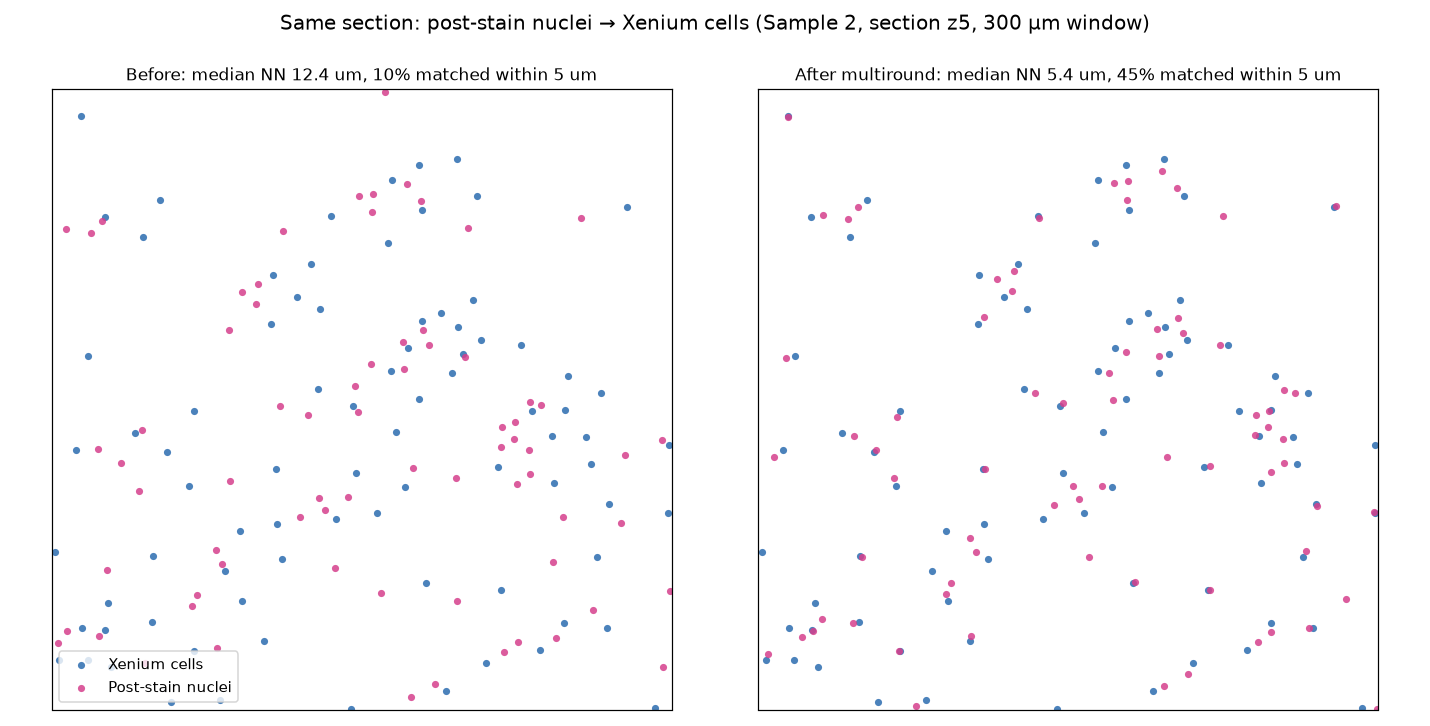
88,906 nuclei and 74,247 Xenium cells, about 17 µm apart; 3 s.
How to read this. tre_validation is measured on a quarter of the nuclei
held out before any matching, and is the number to trust for the transform:
11.0 µm → 4.9 µm. The rounds show the affine voting round did the work; the
finer TPS round didn't improve the fitting nuclei, so it was rejected.
Registration is then refined: 57,083 nuclei snap exactly onto distinct
Xenium cells over four pairing passes, each checked against its
neighbourhood, and 8,266 more are assigned to the free cells around them —
88% of Xenium cells now carry a nucleus. The assigned pairs deviate twice
as much from their neighbourhood (8.5 µm against 4.1 µm), so treat them as
unverified; the output CSV's registration_status and neighbour_deviation
say which is which. See Snapping nuclei onto their cells.
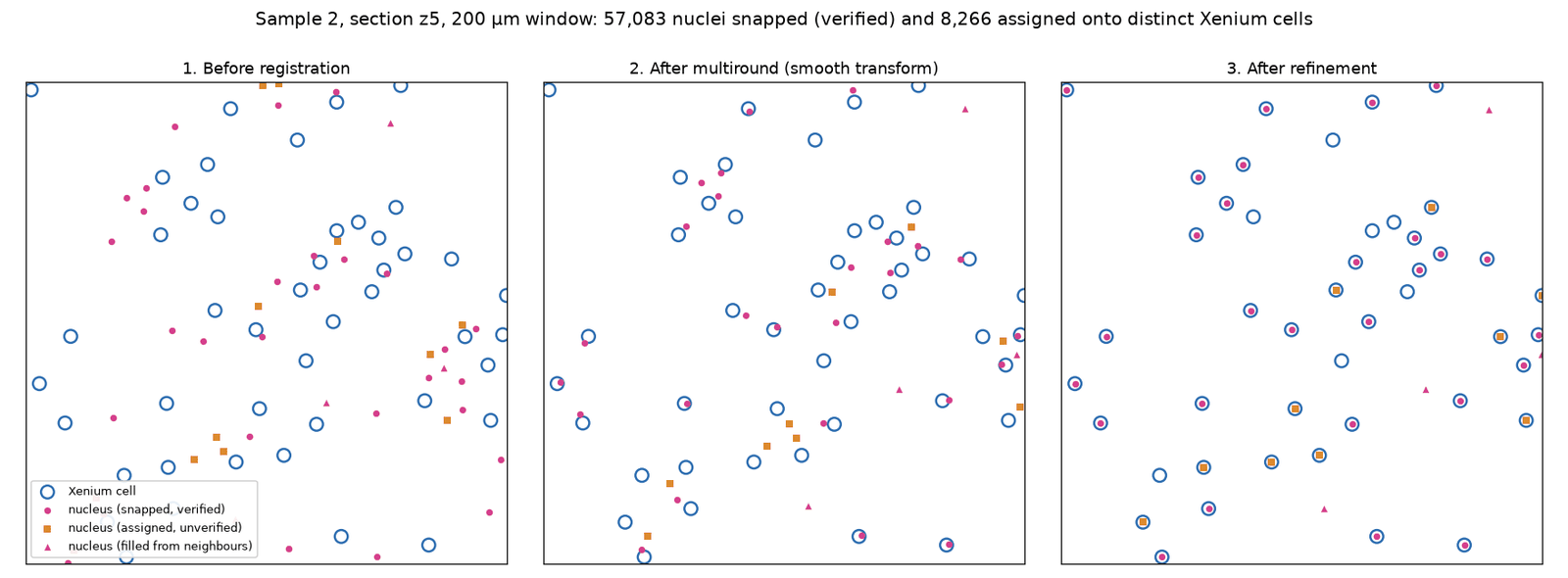
The single-round methods can't do this: they match each nucleus to its
nearest cell before fitting, and with a starting offset close to the cell
spacing most of those matches are wrong. --method ransac+tps only reaches
11.5 µm here. See What multiround does.
Tutorial 2 runs the same two steps on a 1.5 mm × 1.5 mm crop of this section — where the pattern repeats: the affine round is kept, the spline round rejected — and on a synthetic pair where every placement can be checked against the truth.
4. Segmenting an image on one GPU (2048 px crop)
The same call works on a whole slide: it segments the image chunk by chunk, so only run time grows. The image itself is read into memory, so for slides that do not fit, use distributed segmentation (example 5).
A fine-tuned Cellpose-SAM model segments cells, and Cellpose's base model segments nuclei, chunk by chunk:
from smint.segmentation import process_large_image

results = process_large_image(
    image_path="sample3_crop.ome.tif",      # (C, Y, X): ch0 nuclei, ch1 GFAP
    csv_base_path="seg/sample3",
    chunk_size=(1024, 1024),
    cell_model_path="/path/to/models/cpsam_finetuned",
    cells_diameter=120, cells_flow_threshold=0.6, cells_cellprob_threshold=-2.5,
    cells_channels=[2, 1],                  # main = channel 2 (GFAP), nuclear = channel 1
    nuclei_model_path="nuclei",             # Cellpose 4: falls back to cpsam, with a warning
    nuclei_diameter=25, nuclei_flow_threshold=0.3, nuclei_cellprob_threshold=0.2,
    nuclei_channels=[1, 0],
    visualize=True, visualize_output_dir="seg/vis",
)
print(results["total_cells"], results["total_nuclei"])
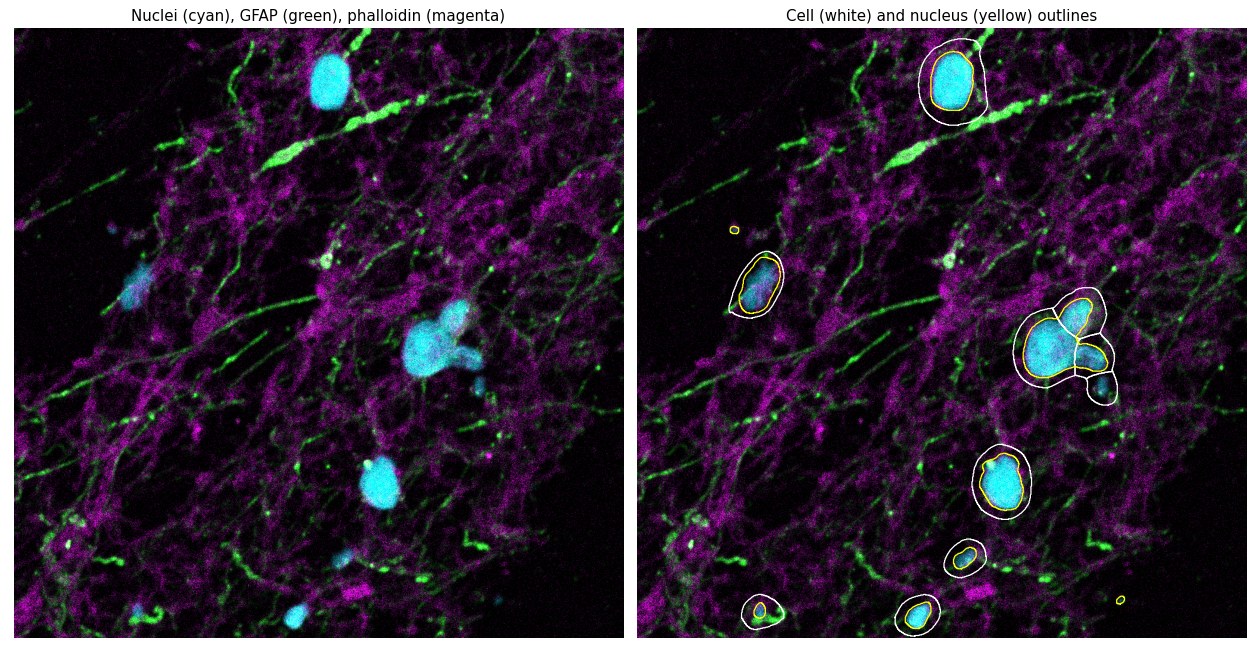
Sample 3, one 1024 px chunk of a 2048 × 2048 px crop; Cellpose 4 on one A30 took 23 s for the crop. Cyan: nuclei; green: GFAP; magenta: phalloidin. Right: cell outlines (white) and nucleus outlines (yellow).
channels follows Cellpose 3's convention ([main, nuclear], 1-based, 0 =
none) and selects the same input on Cellpose 3 and 4.
Tutorial 1 runs process_large_image with
Cellpose 3's built-in models on a synthetic image and on a downsampled Sample 3
crop.
5. Distributed segmentation on SLURM GPUs
For a whole slide, tiles are spread across GPU workers that SMINT launches through SLURM, then stitched and reconciled:
from smint.segmentation import run_distributed_segmentation

results = run_distributed_segmentation(
    image_path="sample3_tile_scan.ome.tif",       # OME-TIFF or OME-Zarr, on shared storage
    output_dir="sample3_segmentation",            # on shared storage too
    cell_model="/path/to/models/cpsam_finetuned",
    nuclei_model="nuclei",
    cell_params={"diameter": 120, "flow_threshold": 0.6,
                 "cellprob_threshold": -2.5, "channels": [2, 1]},
    nuclei_params={"diameter": 25, "flow_threshold": 0.3,
                   "cellprob_threshold": 0.2, "channels": [1, 0]},
    chunk_size=1048, tile_overlap=256,
    backend="slurm", n_workers=4,
    slurm={"queue": "gpuq", "gpu_type": "A30", "memory": "64GB"},
)
Tiles: 16 of 1048 px, 256 px overlap
4 worker(s) ready
Stitched 66 polygons: 44 after merging, 44 after trim/remove
30 of 103 cell outlines touch no nucleus and were dropped
Stitched 73 polygons: 43 after merging, 43 after trim/remove
Reconciled 43 cells / 44 nuclei -> 44 cells / 44 nuclei
Done in 0.6 min
Run the coordinator itself as a small CPU job (sbatch on a CPU partition); it
submits the GPU workers and only stitches. The output directory then holds
cells_outlines.csv / nuclei_outlines.csv (outline vertices),
cells_summary.csv / nuclei_summary.csv (centroids, areas, and which cell
each nucleus belongs to) and full-resolution label masks. See
Tiling and stitching for how tiles are
stitched, and Tutorial 4 to run
the same pipeline on local CPU workers and read its log line by line.
Next steps
- Apply this to your own data: The SMINT workflow.
- Run it on the cluster: Running on HPC.
- Transcripts and metabolites per cell: Tutorial 5 and R integration.
- Every command-line option: Command line.